
Never be stuck for words again.
FlirtPilot analyzes your dating chats with AI and suggests a reply, opener, or profile line that fits — in seconds. It reads the vibe and writes in your voice, using your profile and your match's.
- 2-way translation
- 26 languages
- 4+6 tones
- 9 free generations
- 100% privacy-first
Everything you need, nothing you don't
One copilot for the whole conversation — from the first message to the last.
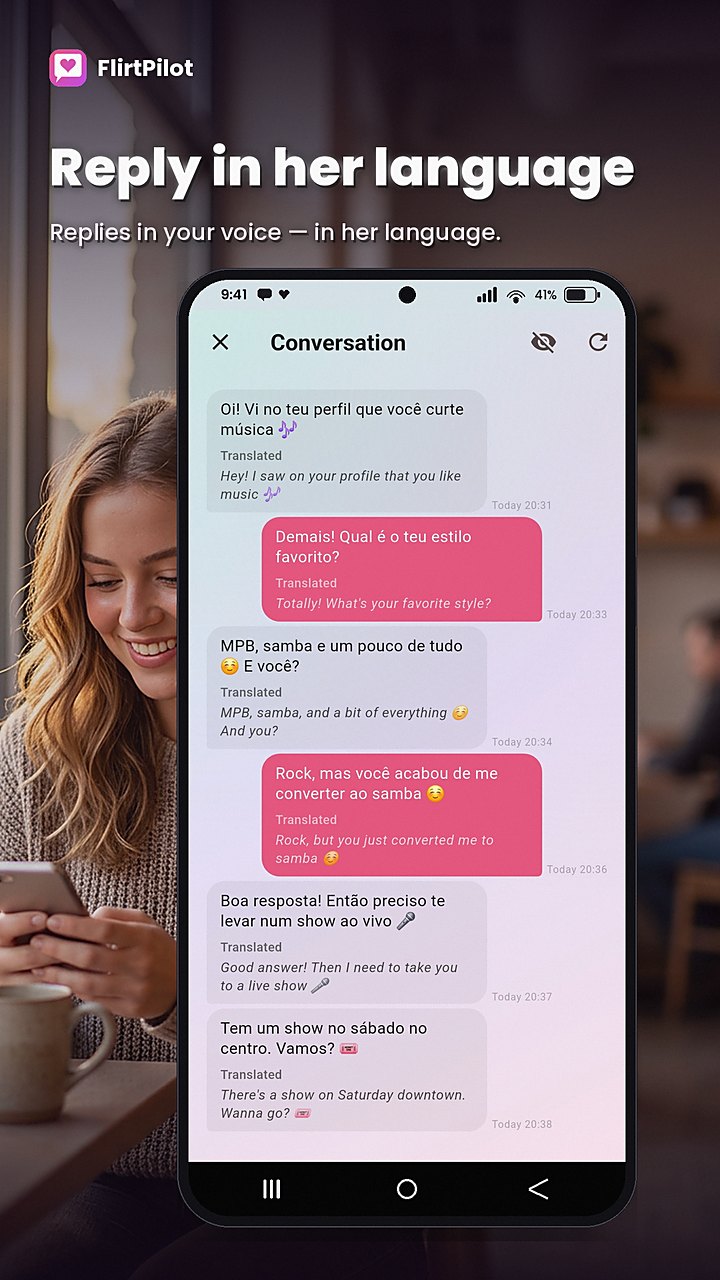
Talk to anyone, in any language
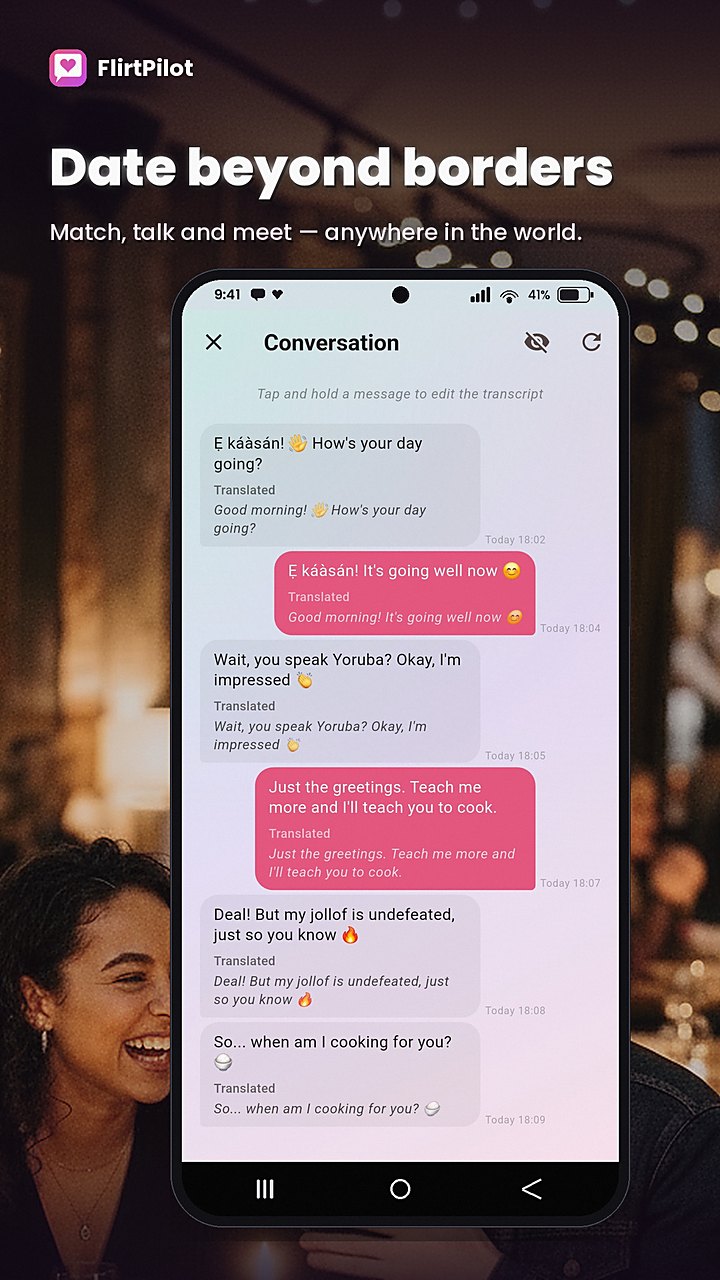
Matched with someone who doesn't speak your language? FlirtPilot detects the language of the conversation, writes your replies in it, and can translate the whole thread into yours — so nothing gets lost in translation.
- Replies generated in your match's language, ready to send
- Translate an entire conversation into your language, message by message
- Translate any single message or AI reply on demand
- 26 languages — from Deutsch and Français to 中文, 日本語, and العربية
Replies that sound like you
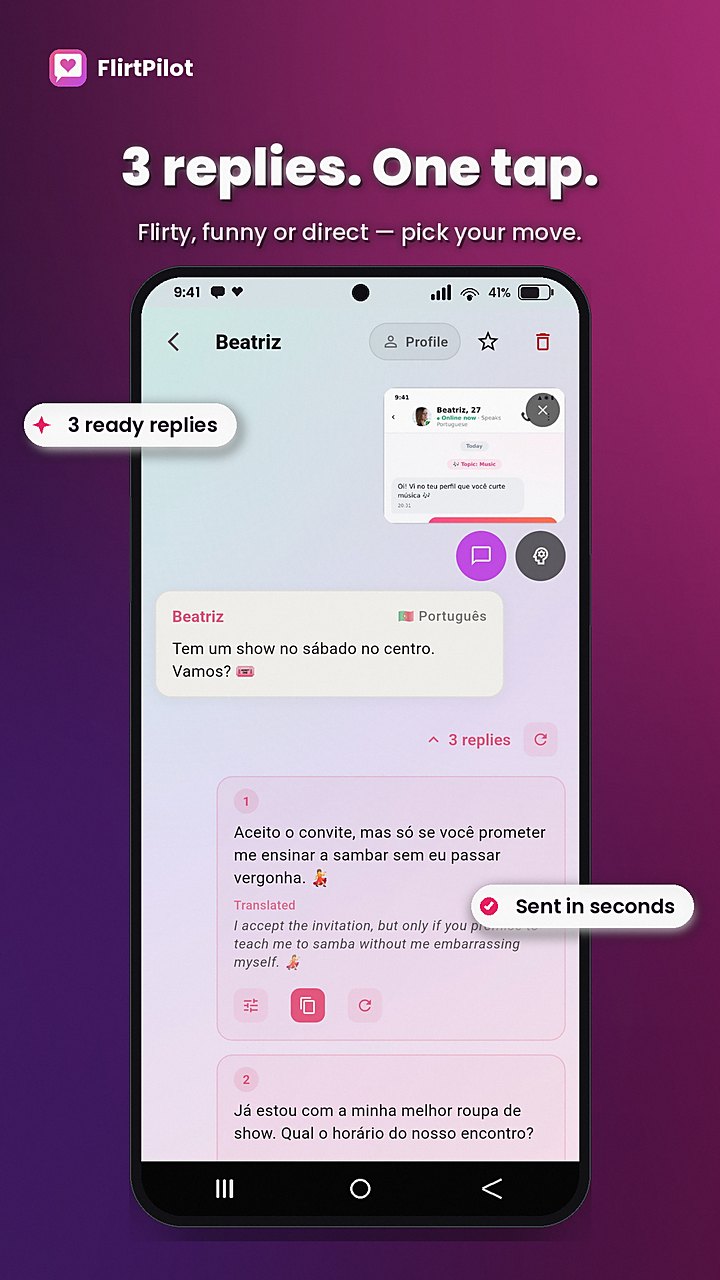
Screenshot your dating chat and get instant, context-aware reply suggestions. Add the match's profile for even smarter replies — FlirtPilot adapts to their vibe too. Four tones and three creativity levels.
- Floating overlay capture — never leave your dating app
- Live conversation thread keeps context across messages
- Import match profile with one tap — replies adapt to their style
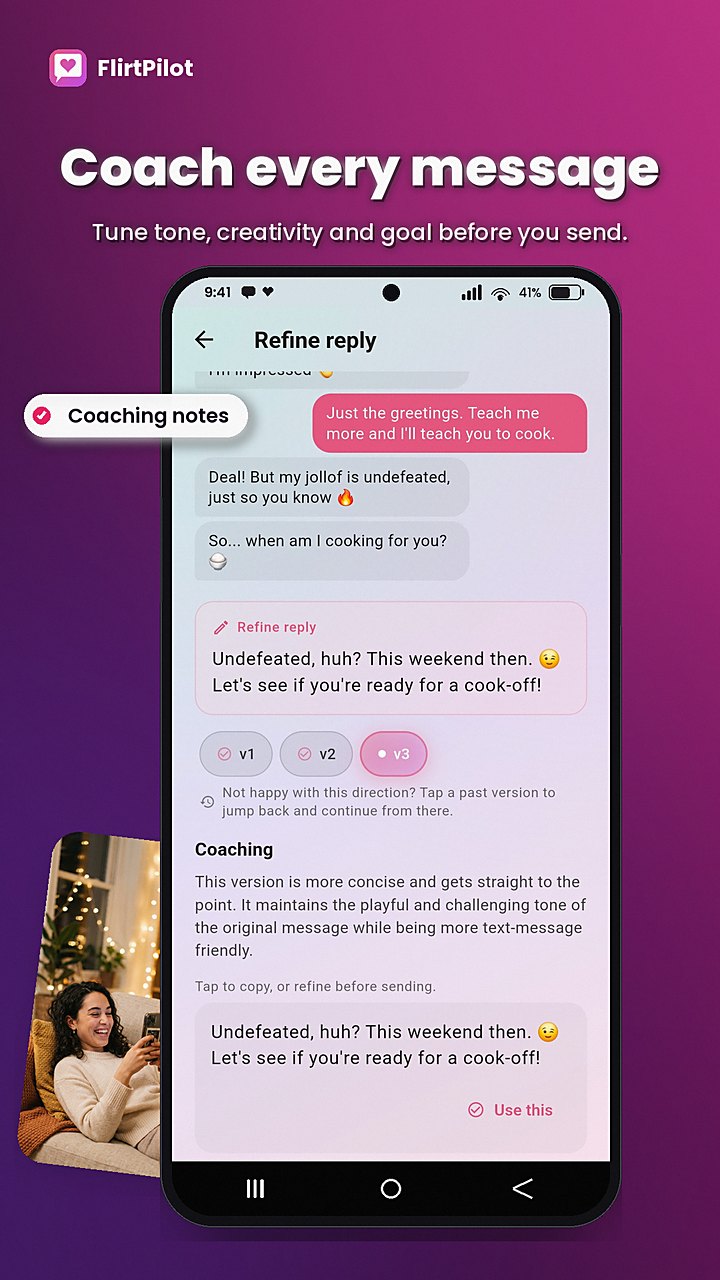
- Refine any suggestion: funnier, shorter, more flirty, add a question
Your personality, amplified
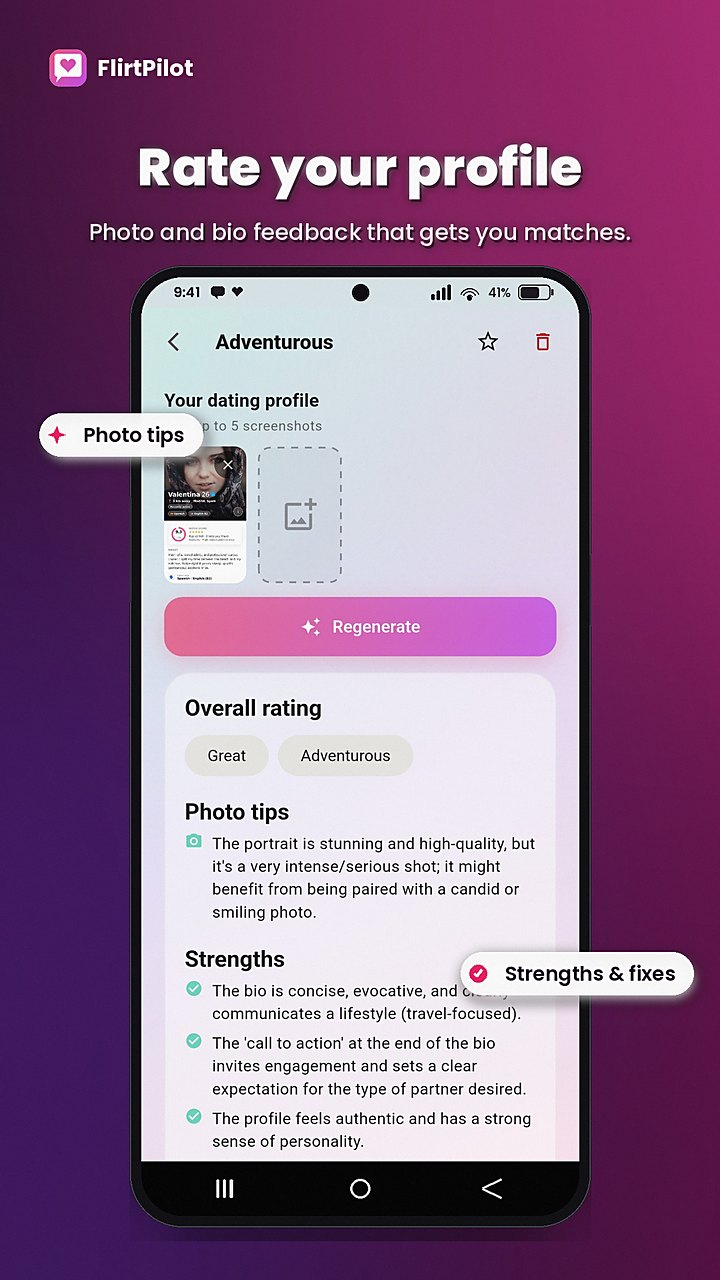
The more FlirtPilot knows you, the more natural every reply gets. Fill in your profile or let AI import it straight from a screenshot of your own dating profile.
- AI profile import from a screenshot — no typing required
- Profile rating with strengths, improvements, and photo tips
- Bio generator that captures your vibe
- Style memory: every suggestion matches your communication style
First messages that stand out
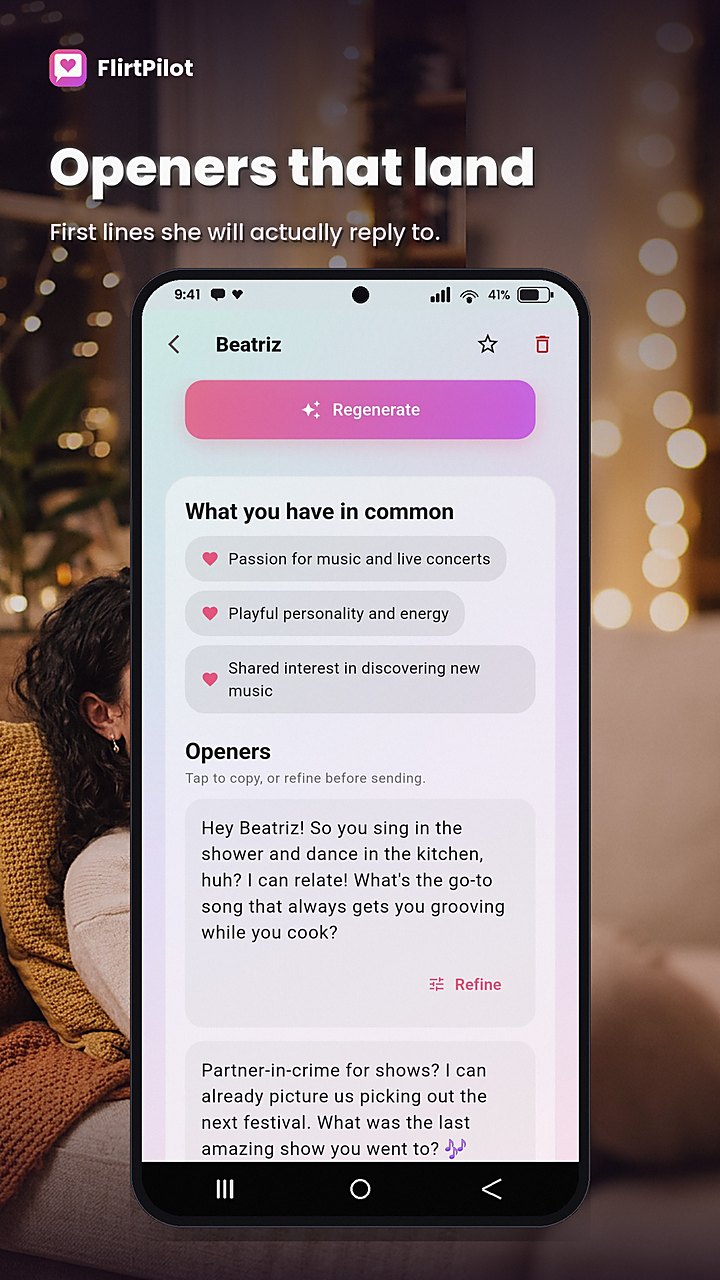
Stop opening with 'Hey'. Screenshot a profile and get personalized openers plus the shared interests to build on — in six tones, from Sweet to Confident.
- Personalized openers built from the actual profile
- Six opener tones: Warm, Flirty, Direct, Funny, Sweet, Confident
- Shared-interest hooks that make a reply easy
- 3 creativity levels to match your comfort zone
Conversation Decoder
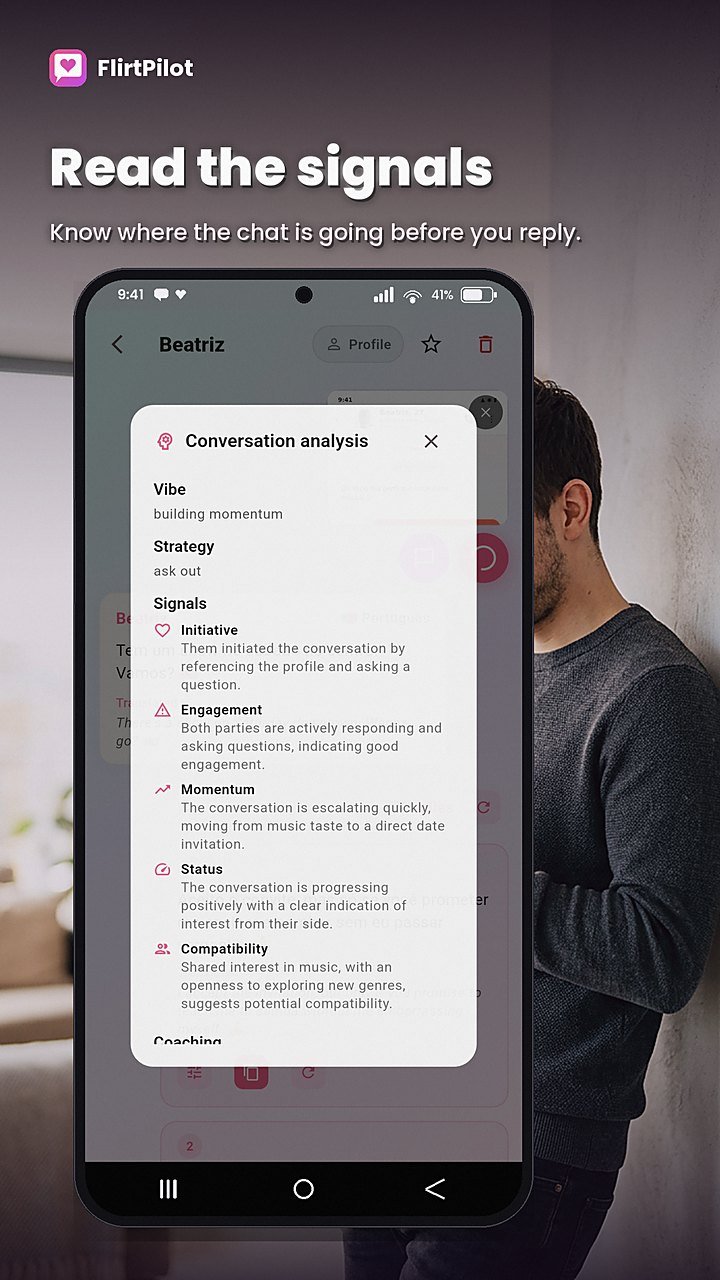
Understand what's really being said before you hit send. FlirtPilot reads the vibe — signals, strategy, and your next move.
- Compatibility read: banter, slow-burn, or low-effort matching
- Red flag scan before you over-invest
- Next-message strategy: tease, ask, deepen, or exit cleanly
- Text Studio — rewrite any message in a different tone or style
- Answer-a-Question — AI-crafted responses to tricky questions
Tricky questions, handled
Paste any dating question and get a crafted answer in your voice — whether it's a deep cut, a playful poke, or a serious "where is this going?". Pick a tone and iterate until the answer feels right.
- Answer-a-Question — paste any prompt and get a winning reply
- Six tones plus your own custom instruction
- Answers in your voice that match your profile style
- Refine and regenerate until it sounds like you
Your words, reimagined
A text editor for anything you'd ever send. Paste a message, bio, or opener and rewrite it in a different tone or style — then refine line by line until it feels right.
- Rewrite any text: messages, bios, openers, captions
- Shift tone or style with one tap
- Iterate and refine until it feels right
- Copy straight from the studio and send
Never lose your chats
Your conversations, saved results, and profile context are backed up to the cloud, so everything comes back after a reinstall or when you switch to a new phone. Back up, restore, or delete your backup whenever you want — it's your data.
- Cloud backup of your chats, results, and saved context
- Restore everything after a reinstall or on a new device
- See when your backup last synced and how big it is
- Delete your cloud backup in one tap — permanent and irreversible
See it in action
Real screens from the app — capture, suggest, refine, send.
Simple pricing, no surprises
No confusing tiers. No pay-per-feature. Upgrade whenever you're ready.
Yearly
≈ $6.67/month. The best value — save ~33%. 1-week free trial.
Try it freeLatest news
Updates, releases, and announcements — fresh off the build.
FlirtPilot 1.0.3 (build 320) — backup, translation, and a faster app
Our biggest build yet: cloud backup and restore for all your chats, two-way translation, a refreshed UI, and high performance even with very large saved histories.
Read announcement →FlirtPilot 1.0.2 — faster, lighter, and smoother in-app browsing
A performance-focused release: faster startup, a smaller app, and a smoother in-app browser experience for authentication and links.
Read announcement →FlirtPilot 1.0.0 is live on iOS & Android
The first public release is here — AI reply suggestions, Conversation Decoder, Text Studio, and more, on both the App Store and Google Play.
Read announcement →Blog & guides
Dating tips and app guides — how to open, reply, decode, and write a bio that gets matches.
Never lose a good conversation again: backup and restore in FlirtPilot
The best replies, openers, and profile ratings are worth keeping. Here's how FlirtPilot's new cloud backup works — and how to restore everything after a reinstall or a new phone.
Read article →Date beyond borders: how translation opens up a whole new world of matches
Why limit yourself to people who happen to speak your language? FlirtPilot's two-way translation lets you match, chat, and connect with people in 26 languages — here's what that unlocks.
Read article →How two-way translation works in FlirtPilot (replies and chat transcripts)
A plain-English guide to FlirtPilot's translation: how replies come back in your match's language, and how to translate a whole chat transcript into yours.
Read article →How to start a conversation on a dating app: 7 openers that actually get replies
Stop opening with 'Hey'. Here's how to craft personalized first messages built from a profile — plus how FlirtPilot generates openers in six tones in seconds.
Read article →How to respond to a message on a dating app (when you have no idea what to say)
Stuck on what to reply? Learn how to write context-aware replies that sound like you — and how FlirtPilot suggests replies in your voice in four tones in seconds.
Read article →How to read the vibe in a dating conversation (and know your next move)
Is it banter, a slow burn, or low-effort? Learn how to decode a conversation's signals — and how FlirtPilot's Conversation Decoder scans for red flags and suggests your next move.
Read article →How to write a dating profile bio that gets matches
Your bio is your first impression. Learn how to write (or rewrite) a dating bio that captures your vibe — and how FlirtPilot's Bio Generator and Profile Rating make it easy.
Read article →How to answer tricky questions on a dating app without breaking a sweat
'Where is this going?' 'Are you seeing other people?' Learn how to craft answer in your voices to hard dating questions — and how FlirtPilot's Answer-a-Question handles them.
Read article →Frequently asked questions
How do I generate a reply?
Open the Replies tab, then capture a chat screenshot — on Android you can use the floating assistant bubble so you never leave your dating app, or import a screenshot from your gallery. Optional but recommended: add your match's profile screenshot. Pick a tone, tap "Generate replies", and review the suggestions. Tap "Copy reply" and paste it back in the dating app. FlirtPilot never sends anything for you.
How do I chat with someone who speaks a different language?
FlirtPilot handles it for you. When you capture a chat, it detects the language your match is writing in and writes your reply suggestions in that same language — so you can reply naturally without translating in your head. Tone, creativity, and refine all work exactly as they do in your own language.
Can FlirtPilot translate a whole conversation into my language?
Yes. Open a conversation and tap Translate to translate the entire thread — every message, yours and theirs — into your app language. Translations are clearly labeled so you always know what's a translation, and if the conversation changes you can retranslate in one tap. You can also translate a single message or any suggested reply on demand.
Will my replies be written in my match's language?
Yes. Reply suggestions are generated in the language of the conversation FlirtPilot reads from your screenshots, so they're ready to send as-is. Your app interface and saved profile stay in your own language — only the message you send matches theirs.
How do I use the Translate feature?
Open a conversation in the Replies tab and tap Translate to translate the whole thread into your app language. You can also translate a single message — or any suggested reply — on demand. Translations are clearly labeled so you always know what's original and what's translated, and if the conversation moves on you can retranslate in one tap.
How does translation work for replies and chat transcripts?
For replies: FlirtPilot detects the language your match is writing in and writes your reply suggestions in that same language, ready to send as-is — tone, creativity, and refine all work exactly as they do in your own language. For chat transcripts: tapping Translate translates every message in the conversation — theirs and yours — into your app language so you can follow the whole thread. Only the message you send matches their language; your app interface and saved profile always stay in yours.
How can I use custom instructions to get exactly what I want?
Custom instructions are your open-ended control. When you refine a suggestion or draft an answer, type your own instruction instead of using a preset — for example \"reply in Spanish\", \"answer in the same language she's using\", or \"give me the reply in her language, then translate it back to English so I understand it\". You can combine instructions too: set the language, the tone, and the goal in one line. That way you can answer in your match's language and still read every word yourself in your app user language.
How do I capture a chat screenshot?
Open the Replies tab and tap the capture button. On Android, grant the overlay permission and use the floating assistant bubble to capture right on top of your dating app. On both platforms you can also import screenshots from your gallery. Multiple chat screenshots are stitched into one live conversation thread so context is kept across messages.
How do I personalize replies so they sound like me?
Set up your profile context. Open the Profile tab, go to the Profile (context) section, and fill in what you're looking for, your dating goals, your vibe, your communication style, interests, education, and work — plus optional details like gender, orientation, languages, name, and age. Tap Save. The more detail you add, the more every reply, opener, and answer matches your personality. This saved context is applied to every feature automatically.
How do I import my own dating profile from a screenshot?
In the Profile tab, open the Profile (context) section and tap "Import from screenshot". Take a screenshot of your dating app profile (or choose one from your gallery). FlirtPilot reads it and fills in the context fields for you — no typing required. Review the fields, correct anything, and tap Save.
How do I personalize a specific chat?
Each conversation keeps its own context. Open a chat in the Replies tab and tap the match-profile chip in the header to capture or import your match's profile screenshot — replies then adapt to their vibe as well as yours. You can also set the tone and creativity level per chat. The live conversation thread remembers everything across screenshots, so follow-up messages stay in context.
How do I refine a suggestion?
Tap "Refine" on any suggestion. Use the quick options — Make funnier, Shorten, Make flirty, Add question, More confident, or More casual — or type your own custom instruction. Every refined version is saved, and you can tap an older version to jump back and continue from there.
What are tones and creativity levels?
Replies come in four tones, openers in six (Warm, Flirty, Direct, Funny, Sweet, Confident), and every feature offers three creativity levels — from playing it safe to pushing it further. Pick the combination that fits the conversation and the person you're talking to.
How do I generate openers?
Open the Opener tab and capture your match's profile screenshot (or import one). Tap "Generate openers". You'll get opening lines built from the actual profile, plus the shared interests you can build on — in six tones and three creativity levels. Copy an opener and send it when you match.
How do I use the Conversation Decoder?
On any chat screenshot, tap Decode. FlirtPilot reads the conversation and gives you a compatibility read (banter, slow-burn, or low-effort matching), a red-flag scan before you over-invest, and a recommended next move — tease, ask, deepen, or exit cleanly.
How do I use Answer a Question?
Open Ask a Question, paste or type the question you've been asked, pick a tone, and tap "Generate answer". The question stays locked so you can keep iterating on your answer with quick refine options or your own instruction until it feels right.
How do I use Text Studio?
Text Studio is a free-form editor for anything you'd ever send. Paste a message, bio, opener, or caption, then rewrite it in a different tone or style with one tap. Refine line by line until it feels right, then copy straight from the studio and send.
How do I rate my profile or generate a bio?
In the Profile tab: for a rating, import screenshots of your profile and tap "Rate my profile" — you'll get strengths, improvements, and photo tips. For a bio, open the Bio section and either import your current bio from a screenshot or write one from scratch, then generate. Review and refine until it captures your vibe.
Which dating apps does it work with?
Any app that allows screenshots — Tinder, Bumble, Hinge, and more. On Android, a floating overlay bubble captures the chat without leaving your dating app.
Do my screenshots get stored?
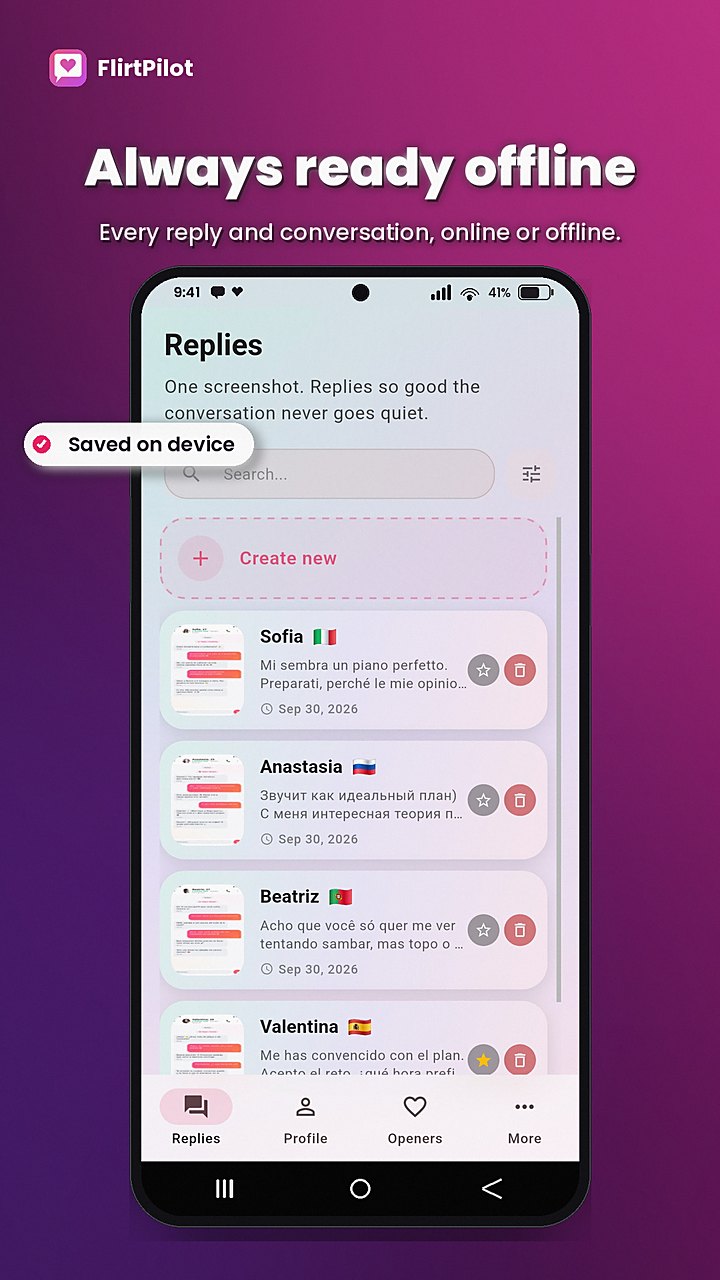
Screenshots you keep are saved on your device only and can be deleted anytime; screenshots sent for processing are not kept afterwards. If you use Chat backup, your saved chats and results are also copied to secure cloud storage tied to your account, and you can delete that cloud backup at any time. Your account data and saved profile context stay under your control and can be cleared at any time.
How do I back up my chats and results?
Open the More (Settings) tab and find the Chat backup card, then tap "Back up now". FlirtPilot packages your saved chats, replies, openers, decoder results, ratings, bios, and profile context into a secure cloud backup tied to your account. The card shows when you last synced and how big the backup is, and FlirtPilot also refreshes it in the background.
How do I restore my chats after reinstalling or switching phones?
Sign in to the same account on the new install or device. FlirtPilot detects that a cloud backup exists and offers to restore it — your chats, saved results, and profile context come back exactly where you left them. Restoring merges into anything already on the device, so nothing new is lost. If a backup already exists, FlirtPilot asks before replacing it.
How do I delete my cloud backup?
Open the More (Settings) tab, find the Chat backup card, and tap "Delete backup". This permanently deletes the cloud copy stored for your account — it can no longer be restored after a reinstall. Your data on this device and your server-side profile are not affected. This action can't be undone.
How do I reset my saved profile data?
Open the More (Settings) tab, open Account, and tap "Reset profile". This immediately clears everything the AI knows about you — dating goals, interests, vibe, style, education, work, and more — while keeping your account active. Your saved history and cloud backup are kept, and you can re-enter your details anytime.
How do I clear my on-device history?
Open the More (Settings) tab and tap "Clear history". This deletes all saved results and screenshots on that device only — your server-side profile and your cloud backup are not affected. Use this when you want a clean slate locally but want to keep the ability to restore later.
How do I delete my account and all my data?
Open the More (Settings) tab, open Account, and tap "Delete account". This permanently deletes your account, everything the AI knows about you, your usage history, and your cloud backup. Deleting your account does not cancel an active store subscription — cancel it in the Google Play or Apple App Store first to stop future charges. You can also request deletion by email; see legal.flirtpilot.app/deletion.
Is there a limit on how many replies, openers, or ratings I can save?
No. The old limit of 30 saved entries per type has been removed — every reply, opener, decoder result, profile rating, and bio is kept. The app is optimized to stay fast and smooth even with a very large history, and you can filter saved entries by date to find any item quickly.
Does FlirtPilot stay fast with a large history?
Yes. This build added high-performance storage, faster thumbnail decoding, and smoother list rendering so the History screen scrolls fluidly even with thousands of saved entries. Combined with the removal of the 30-entry cap and date-range filtering, you can keep everything and still find it in seconds.
What's new in the latest build?
Build 320 of 1.0.3 adds cloud backup and one-tap restore, backup deletion, two-way translation, a refreshed UI with formatted timestamps and date filtering, and high performance for very large histories — plus the removal of the old 30-entry cap.
Is FlirtPilot a dating app or a bot?
Neither. FlirtPilot is an AI dating copilot. Swiping and messaging still happen in the official dating apps — FlirtPilot helps you communicate better inside them. It never messages anyone for you.
What languages are supported?
26 languages — from English and Deutsch to 日本語, العربية, and more. FlirtPilot works both ways: it writes in your match's language and translates their messages into yours, so you can date across any of them.
Can I try it for free?
Yes. New accounts get a set of free AI generations across every feature — replies, openers, the decoder, bio, and more — with no subscription required. Paid plans also include a free trial.
How much does it cost?
One price unlocks everything: $4.99/week, $9.99/month, or $79.99/year (best value). All plans include a free trial. No confusing tiers.
iOS is coming soon
FlirtPilot for iPhone is on the way. Join the waitlist and be first in line when it launches — Android is live now.
Better conversations start here.
AI reply suggestions for your dating chats — in seconds.